scpmkj@gmail.com
Get A Free Quote


 share
share
When it comes to inkjet printers, I believe that few friends are unfamiliar with it. In today's production and life, the application of inkjet printers can be said to be everywhere. At the same time, this device has once become a topic of discussion among people. Today, Xiaobian wants to Let you understand two issues about this device, one is its operating process, and the other is the precautions for using it.
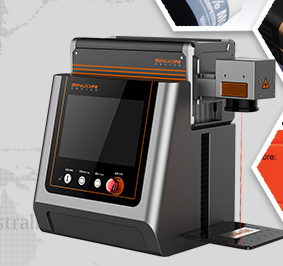
1. Operation process
(1) First, turn on the machine. The system has a one-button setting. You just need to turn on the power supply, turn on the power button, turn on the spray head, clean and check the spray head.
(2) After the inkjet printer is turned on, the identification and coding requirements can be completed under the originally set parameters. For some special requirements, such as synchronization, meter counting, piece count, etc., the coding equipment can also set relevant parameters to complete these tasks by itself.
(3) When setting, you can see the changes in settings on the screen. This is the "WYSIWYG" function of the screen. According to the parameters on the screen, the content of the logo can be easily adjusted.
(4) After the printing work is completed, for the coding equipment that is undergoing short-term rest, a cleaning agent needs to be added to clear some of the ink residues, and the related actions of shutting down are performed. For machines that have been resting for a long time, they need to be cleaned more thoroughly to facilitate smooth use next time.
2. Matters needing attention
(1) Most inkjet printer inks contain ingredients that are easily volatilized and inhaled into the lungs. Good ventilation must be ensured.
(2) If it is accidentally dripped, please quickly rinse with a large amount of water for 15 minutes. If you feel unwell after cleaning, clean it and seek medical attention urgently.
(3) If the code coding equipment insurance burns out, please be sure to replace the fuse with the same specification. You should contact the supplier to have the supplier come and provide code coding equipment repair services.
(4) In cable factories and other enterprises with large-scale electrical equipment, UPS uninterrupted power supply should be prepared to prevent unstable operation of the coding equipment and damage to the power supply.
In addition, the use of coding equipment is different from other equipment. Its principle relies on electrostatic deflection, so it must be well grounded. If the grounding is not good, static electricity accumulates to a certain extent and may cause sparks and cause a fire. Through Xiaobian's introduction to this equipment, everyone will have further increased their understanding of this equipment, and at the same time, they will also know better how to make good use of and maintain this equipment.






