scpmkj@gmail.com
Get A Free Quote


 share
share
A handheld inkjet printer is a kind of inkjet printer that can be easily carried and printed. It is widely used in product packaging, food and beverage, medicine and chemical industry and other fields. It is efficient and convenient. It can print important information such as production date, expiration date, and batch number. It is one of the important tools for product traceability. Handheld inkjet printers are generally divided into two types: oily ink and quick-drying ink. Selecting the appropriate ink type according to different use scenarios can achieve better printing results.
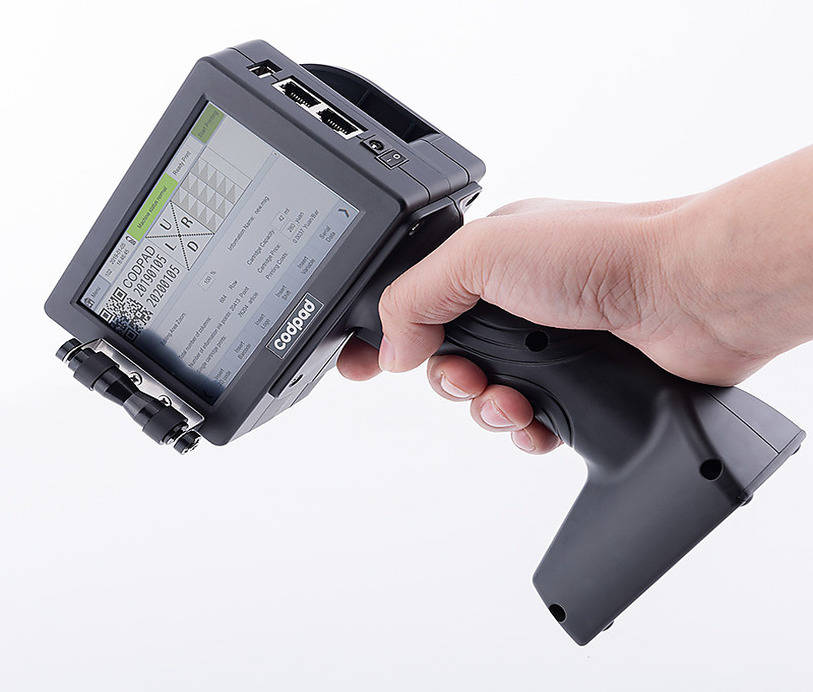
Compared with traditional fixed inkjet printers, handheld inkjet printers have the following advantages:
1. Efficient and convenient: The handheld inkjet printer does not need to be connected to a power supply or compressed air, and can be used only by charging, which greatly improves work efficiency;
2. Strong adaptability: Handheld inkjet printers can meet the printing needs of products of different sizes and shapes;
3. Low cost: The handheld inkjet printer has low maintenance costs, and ink cartridge consumables are affordable;
4. Simple operation: The handheld inkjet printer adopts a touch screen operation interface, making it easy to learn to operate.
Steps to use handheld inkjet printer
1. Boot up: Press and hold the power button of the handheld inkjet printer, and the screen lights up, indicating that the device started successfully.
2. Ink cartridge installation: Insert the ink cartridge into the designated position according to the instructions of the equipment manual and gently rotate it to a locked state to ensure that the ink cartridge is installed firmly.
3. Connect to WiFi: Find the "Settings" option on the screen of the handheld printer, click to enter and select "Network", select the appropriate wireless network and enter the password to connect. After connecting to WiFi, you can easily control the handheld printer remotely through your mobile phone or computer.
4. Setting parameters: Set font size, print content and other parameters according to actual needs. The handheld inkjet printer supports multiple languages and font selections, and can be personalized according to actual needs.
5. Print test: Conduct a print test before official use, and conduct batch printing after confirming that the print effect meets the requirements.
6. Official printing: The handheld inkjet printer can complete the printing task by moving smoothly close to the surface of the object to be printed.
7. Cleaning and maintenance: After use, the equipment should be cleaned and maintained in accordance with the equipment instructions to ensure normal operation of the equipment and extend its service life.
Common problems and solutions for handheld inkjet printers
1. Poor printing effect
Causes: The ink cartridge is not installed correctly; the print head is blocked; printing parameters are not set properly.
Solution: Check that the ink cartridge is installed correctly; clean the print head; adjust printing parameters.
2. The device cannot be turned on
Reason: The battery is low; the power adapter is damaged.
Solution: Charge the handheld printer; replace the power adapter.
3. Unable to connect to WiFi
Reason: The device is too far away from the router; the WiFi password entered is incorrect; the router signal is unstable.
Solution: Get close to the router; re-enter the correct WiFi password; check that the router is working properly.
4. The printed content is unclear
Causes: There is insufficient ink in the cartridge; the printing speed is too fast; the print head is seriously worn.
Solution: Replace with new ink cartridges; slow down printing speed appropriately; replace print heads.
Precautions for daily maintenance of handheld inkjet printer
1. Regularly clean the print head to prevent dust and stain accumulation from affecting print quality.
2. Use original ink cartridges to avoid equipment failure caused by using inferior ink cartridges.
3, pay attention to the handheld inkjet printer moisture and waterproof measures to avoid equipment moisture or water damage.
4. When storing handheld inkjet printers, they should be placed in dry and ventilated places to avoid damage caused by long-term exposure or humid environment.
5. Do not disassemble the internal parts of the handheld inkjet printer at will to avoid affecting the normal operation of the equipment.
6. Observe the operating environment temperature and humidity range specified in the manual for use of the handheld inkjet printer, and do not allow the handheld inkjet printer to work under extreme temperature conditions for a long time.
Xiao Bian comments
With its efficient and convenient operation methods and powerful functions, handheld inkjet printers have gradually become an indispensable helper for enterprises. It not only improves production efficiency and reduces labor costs, but also ensures accurate product labeling, which helps to improve corporate image and market competitiveness. During use, we still need to pay attention to the maintenance of equipment to ensure long-term stable operation. I hope the above usage guide can help everyone better master the use of handheld inkjet printers. Bring more convenience to enterprise production and management.
With the development of technology and changes in market demand, handheld inkjet printers are gradually becoming an indispensable part of all walks of life. Their advantages such as strong portability and easy operation bring great convenience to users. As long as we master the correct usage methods and do a good job in daily maintenance work, the handheld inkjet printers can maximize their effectiveness and help enterprises remain invincible in the fierce market competition.






