scpmkj@gmail.com
Get A Free Quote


 share
share
When using the inkjet printer to print products on a daily basis, regular maintenance is also needed for the inkjet printer itself. This article mainly introduces you to the operating steps of how to correctly clean the nozzle of the Domino inkjet printer. I hope it will be helpful to everyone after reading it.
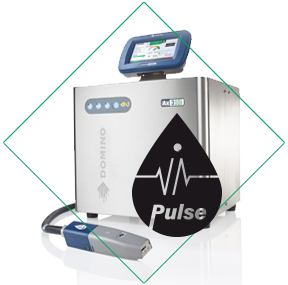
First, we need to prepare tools: T6 Torx screwdriver and Domino cleaner. It should be noted here that the cleaning agent used to clean the nozzle of the inkjet printer is a chemical. Be careful to splash it on your eyes or skin, and protective measures need to be taken. When cleaning, the printer must be turned off before starting this step. During this step, if the printer is running, the cleaning agent will enter the recovery tube and may cause the ink viscosity to drop.
Turn off the printer:
1. Turn off the printer, press and hold the power button for 2 seconds, and wait for the domino printer to turn off.
2. Disconnect the power plug from the back of the printer.
3. Press the two nozzle cover retaining clips next to the nozzle (for i-Pulse single nozzles), or loosen the retaining screws (for i-Pulse dual nozzles). Remove the sprinkler cover.
4. For the i-Pulse single nozzle, gently press on both sides of the inner cover to loosen the retaining clip. Gently pull downward and lift the inner cover from below, then remove it from the spray head.
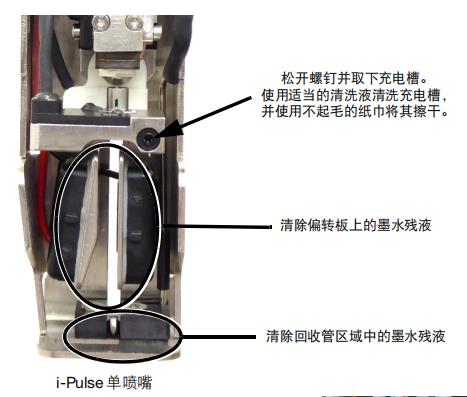
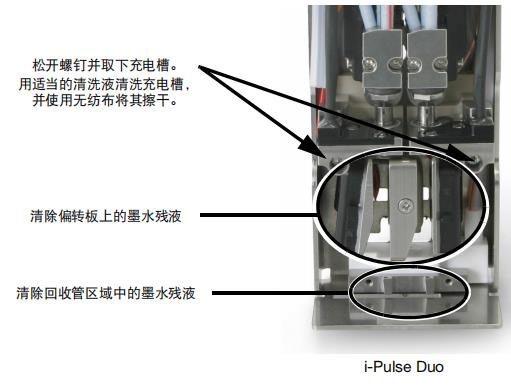
5. Follow the notes in the figure below, and an additional container for collecting waste liquids needs to be prepared.
Single nozzle step:
① Loosen the screws and remove the charging slot. Clean the charging tank with appropriate cleaning solution and dry it with a lint-free paper towel.
② Remove the ink residue on the deflection plate.
③ Remove ink residue in the recovery tube area.
Double nozzle steps:
① Loosen the screws and remove the charging tank. Clean the charging tank with appropriate cleaning solution, and dry it with a nonwoven fabric.
② Remove the ink residue on the deflection plate.
③ Remove ink residue in the recovery tube area.
6. Install the nozzle cover back.
The above are the operating steps for correctly cleaning the nozzle head of Domino Ax series inkjet printers.
Let's introduce the i-Pulse RS nozzle (high-speed machine, the nozzle of this printer is circular)
When using heavy pigment inks, the i-Pulse RS nozzle needs to be cleaned regularly. Please check the sprinkler head before each shift change and clean it if necessary.
The steps to clean the i-Pulse RS spray head are as follows:
1. Turn off the printer, press and hold the power button for 2 seconds, and wait for the domino printer to turn off.
2. Disconnect the power plug from the back of the printer.
3. Remove the nozzle cover.
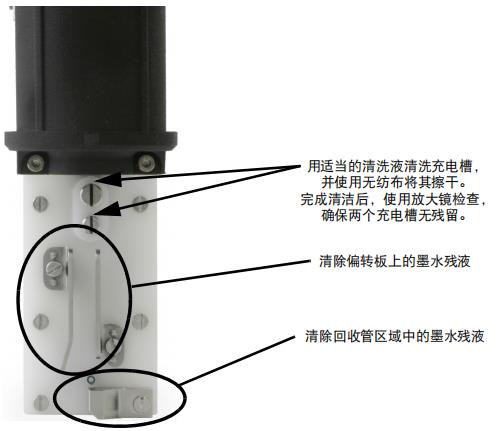
4. Follow the notes in the figure below, and an additional container for collecting waste liquids needs to be prepared.
① Clean the charging tank with appropriate cleaning solution and dry it with a nonwoven fabric. After cleaning, use a magnifying glass to check to ensure that there are no residues in the two charging tanks.
② Remove the ink residue on the deflection plate.
③ Remove ink residue in the recovery tube area.
5. Install the nozzle cover back.
Step ends.






